GitHub Issue Link Graph and Reading Order
Paste one public GitHub issue or PR URL. Resolve maps the issues and pull requests it links to, including across repositories, and gives you a numbered order to read them in. It does not fix issues or replace GitHub sub-issues.
01·THE PROBLEM
Why one GitHub issue turns into twenty open tabs
You open one GitHub issue to contribute. The body cites another issue. A comment points at a pull request. That PR mentions a helper in a second repository. An hour later you have twenty tabs and no order.
Related issues are easy to miss when they live in another org’s repo. Linked PRs hide in “also see” comments. The thread itself does not show the full map — only scattered links.
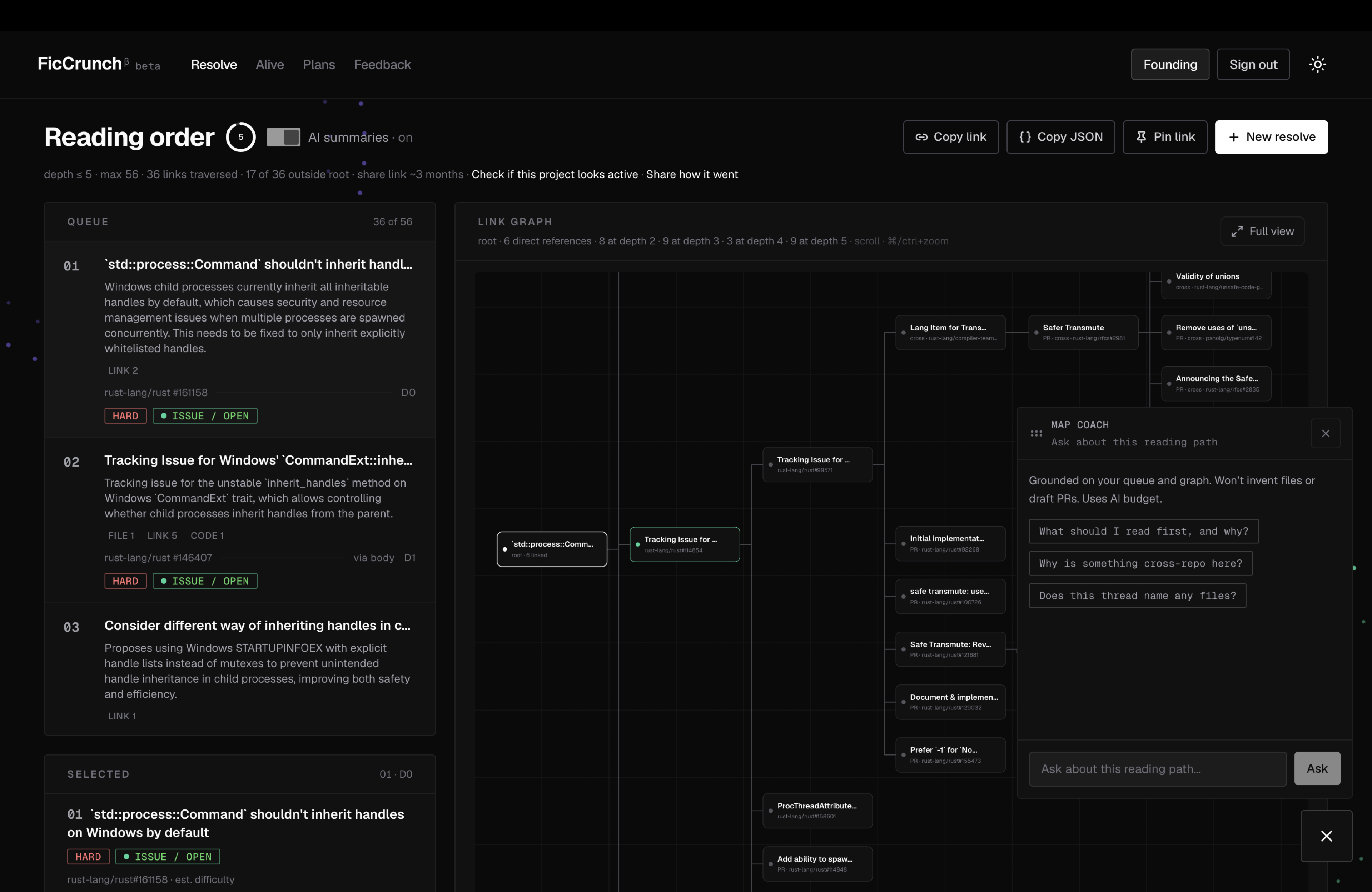
Resolve is built for that paste. You give it one public issue or PR URL. It returns the link graph of what that thread actually names, plus a reading order so you know what to open first. Resolve stops at 56 linked items or 5 levels deep. It will not walk the whole project.
02·HOW IT WORKS
How the GitHub issue link graph is built
Paste one public issue or PR URL. Resolve follows the links named in it, stops at a fixed limit, and shows a graph with a numbered reading order.
01·PASTE
Paste a GitHub issue or PR URL
That URL is the root. Resolve follows links named in the issue or pull request — comments and body — and stops at a fixed limit. It does not walk the whole repository.
02·GRAPH
Explore the bounded link graph
You get one set of linked issues and pull requests around the URL you pasted. Select a node to see where it sits in the path.
03·ORDER
Follow the numbered reading order
The same set is numbered so you know what to open first. That order is deterministic: the same public URL always produces the same sequence. Root first, then shallower links before deeper ones, open threads before closed, then earlier mentions before later ones.
04·CROSS-REPO
See related issues across repositories
When the text names another repository, Resolve can include that public issue or pull request. Use it to find related pull requests that live outside the starting repo. It will not crawl an entire organisation.
03·AI
Optional AI summaries for each node
The link graph and the reading order come first. They do not need AI. Turn summaries on when you want a short blurb on a node. Leave them off when you only need the path. Sign-in is required for summaries. They are optional notes on public threads — not a replacement for reading the issue.
04·LIMITS
What Resolve does not do, and how it differs from GitHub sub-issues
Resolve orients linked context. It does not do the work for you and it does not pretend GitHub already has this graph. GitHub sub-issues are a planned tree you attach. Resolve is the unplanned web of references already in the public thread.
- It does not fix the issue or open a pull request for you.
- It does not replace GitHub sub-issues. Sub-issues are planned work you attach on purpose. Resolve follows mentions and links that already exist in public text.
- It does not crawl an entire repository or organisation.
- It does not work with private repositories in this version.
- It does not claim to find every related pull request — only those linked from the bounded crawl.
05·TRY
Try the link graph on your own GitHub issue
Use the form at the top of this page. Paste a public GitHub issue or pull request URL. You will get a bounded link graph and a numbered reading order. Guest and paid caps differ — see Free and Pro resolve limits.
Not sure the repo is active? Check first.
06·QUESTIONS
Questions about GitHub issue link graphs
- What is a GitHub issue link graph?
- A GitHub issue link graph is a visual map of how one issue connects to the other issues and pull requests it links to, including across repositories. Resolve builds one from a single URL and stops at a fixed limit, so you get the relevant threads and not the whole project.
- How do I find related GitHub issues?
- Paste the issue you care about. Resolve follows links from that root and returns a numbered reading order. It does not search the whole tracker or guess issues that were never linked.
- How do I find related pull requests for an issue?
- Paste an issue or a pull request URL. Linked PRs in the crawl appear in the graph and in the reading order when the public text points to them.
- How is Resolve different from GitHub sub-issues?
- Sub-issues are a hierarchy you create. Resolve follows the wider web of mentions and links already in comments and bodies, including other repositories.
- Does Resolve work on private repositories?
- Not in this version. It reads public GitHub issues and pull requests. Sign-in does not unlock private repos.
- When should I use Alive instead of Resolve?
- Alive checks whether a repository has recent public activity, so use it before you invest time in a project. It does not replace Resolve.